AI document readingLegal AI Agent2026
AI reads the whole case file, runs triage, and writes the draft. Approving, teaching, and signing remain the lawyer's acts.
- Client
- Corporate law firm
- Role
- Product builder: discovery, design, and AI-driven development
- Timeline
- 5 weeks
- Disciplines
- Product discovery, UX/UI, AI systems design, Security and privacy
The context
A corporate law firm works on debt enforcement litigation, on both sides: it collects for those who hold a credit and defends those being pursued. It’s reading-heavy work. A typical case file brings together the contract, the credit instruments, notices, debt spreadsheets, and court filings, often hundreds of pages, some of them scanned.
The lawyers were already using AI. Each one in their own chat, with a set of instructions written by the firm itself, paying for more than one subscription. The manual work sat around that: pasting documents, rereading the file to trust a sentence, saving the analysis in Word, repeating a correction a colleague had already made.
The product I built reads the entire case file, scanned pages included, runs triage, and writes the draft. The lawyer checks the source of every finding, approves it with name and time on record, and decides what the system learns. Nothing is saved or signed without a person.
That existing workflow set the bar: the new product couldn’t deliver less than the chat already did.
I ran the project from start to finish: discovery, product decisions, interface design, and building the system, with a team of AI agents writing code under human approval gates.
The pain
The generic chat handled the reading, but left everything else to be done by hand:
- Nothing stayed with the case. Analyses, versions, who reviewed, what changed: it all lived in one person’s conversation and in scattered Word files.
- The cost was invisible. Nobody knew how much an analysis cost before asking for it. Only on the bill.
- Claims without a source. In a legal opinion, a sentence without the page it came from forces the lawyer to reread the entire case file before trusting it.
- Confidentiality. Court cases carry sensitive personal data and are covered by attorney-client privilege. Pasting that into a personal chat is a door with no log and no way to revoke access.
- Knowledge didn’t accumulate. A correction one lawyer made today never reached a colleague’s analysis tomorrow.
The research
Before designing a single screen, I documented the existing workflow, how the lawyers actually used the chat, and pulled from it the requirements most likely to get lost in a migration. Four became product law:
- A binary conclusion. Triage answers “would I file today?”, with caveats, not an essay.
- Documentary gaps, with the defense each one opens. “The protest is missing” isn’t enough. The value lies in saying what the other side will do with that gap.
- Declare what couldn’t be read. An illegible scanned page is a declared limitation, never silence.
- Mandatory anchors. Every conclusion cites the passage and the page. An answer without an anchor is treated as a serious bug.
From there came the decisions that hold up everything else:
- Everything the machine writes is a draft. The interface says so on every analysis, every chat response, every document. Approval is an act of the lawyer, with name and time on record.
- The side of the case is a human choice. Creditor and debtor cases trigger on the same terms (“bank enforcement,” “credit note”). Getting the side wrong would produce a filing that defends the very party the client wants to collect from. That’s why the side is never inferred from the text.
- Learning without training. The firm asked for “the agents to learn.” I researched the fine-tuning route and it didn’t add up: not offered for current models, expensive to keep running, and risky with client data. The alternative that recent research supports is to keep the model fixed and let the context evolve: short rules learned from corrections, a public-domain knowledge base, approved examples.
- Estimate before running. Every paid run shows what it should cost before the click, and each case has a budget cap.
The solution
The human gate
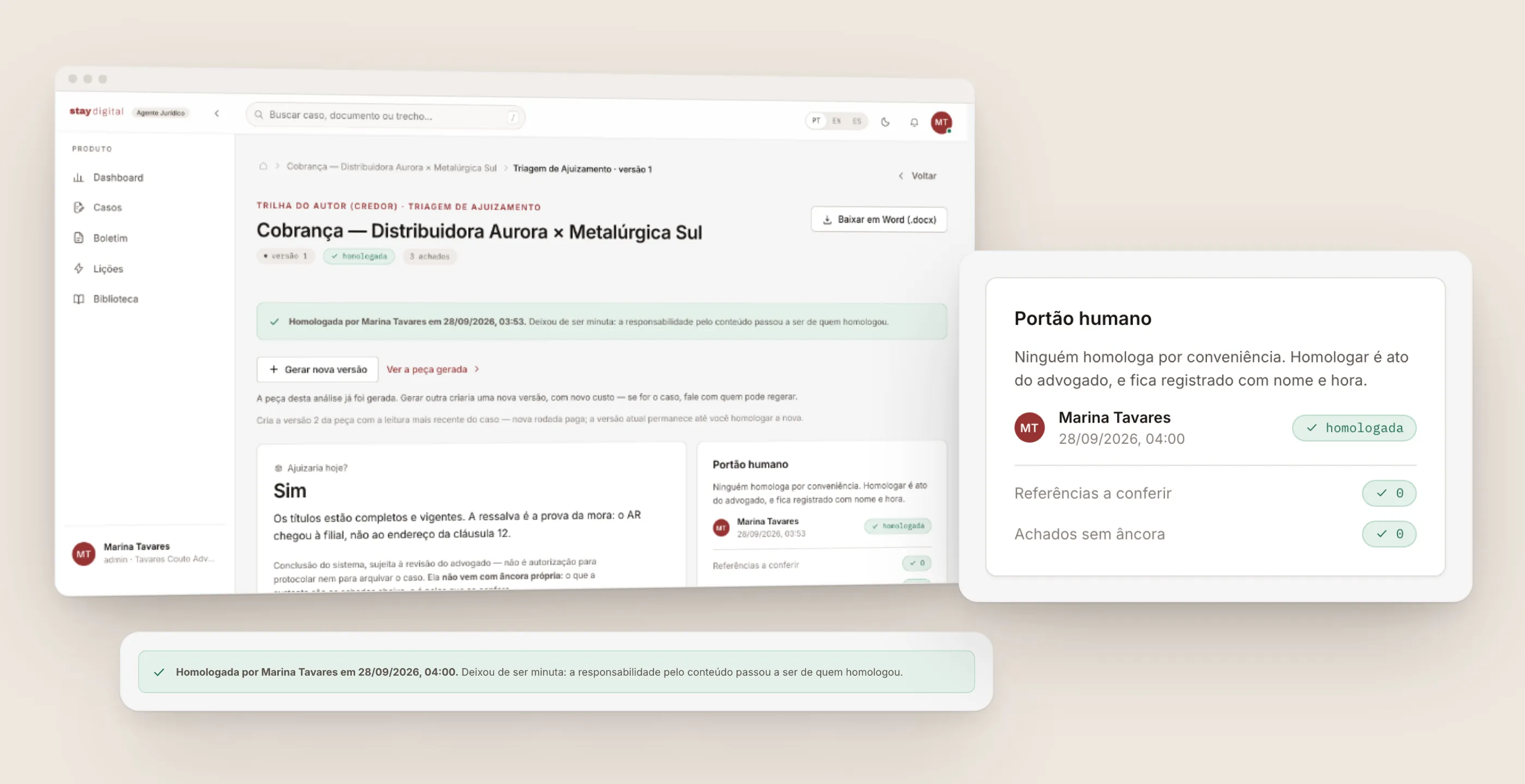
The product’s central decision fits in a single panel. Next to its content, every analysis has a “human gate” that shows who approved it and when, how many references still need to be checked against the original, and how many findings have no anchor.
Until someone approves it, the panel reads “no reviewer yet.” When someone does, the green bar records the handoff of responsibility: the analysis stops being a draft and belongs to whoever signed off on it.
Triage opens with the answer the lawyer would give: would I file today? Right below, the screen itself warns that this conclusion has no anchor of its own. What supports it are the findings, and that’s where it gets checked.
The case as the backbone
The entry point is simple: the lawyer drops in the documents and the case is created from them. Each card shows the side (plaintiff or defendant), the parties, and the case number when there is one, because mixing up the side is the system’s most expensive mistake.
Inside the case, a guided flow shows where it stands: documents, triage, audit, approval, draft, filing approval. The steps derive from what already exists in the case, not from a status someone forgot to update. The lawyer can skip steps, but always knows what comes next.
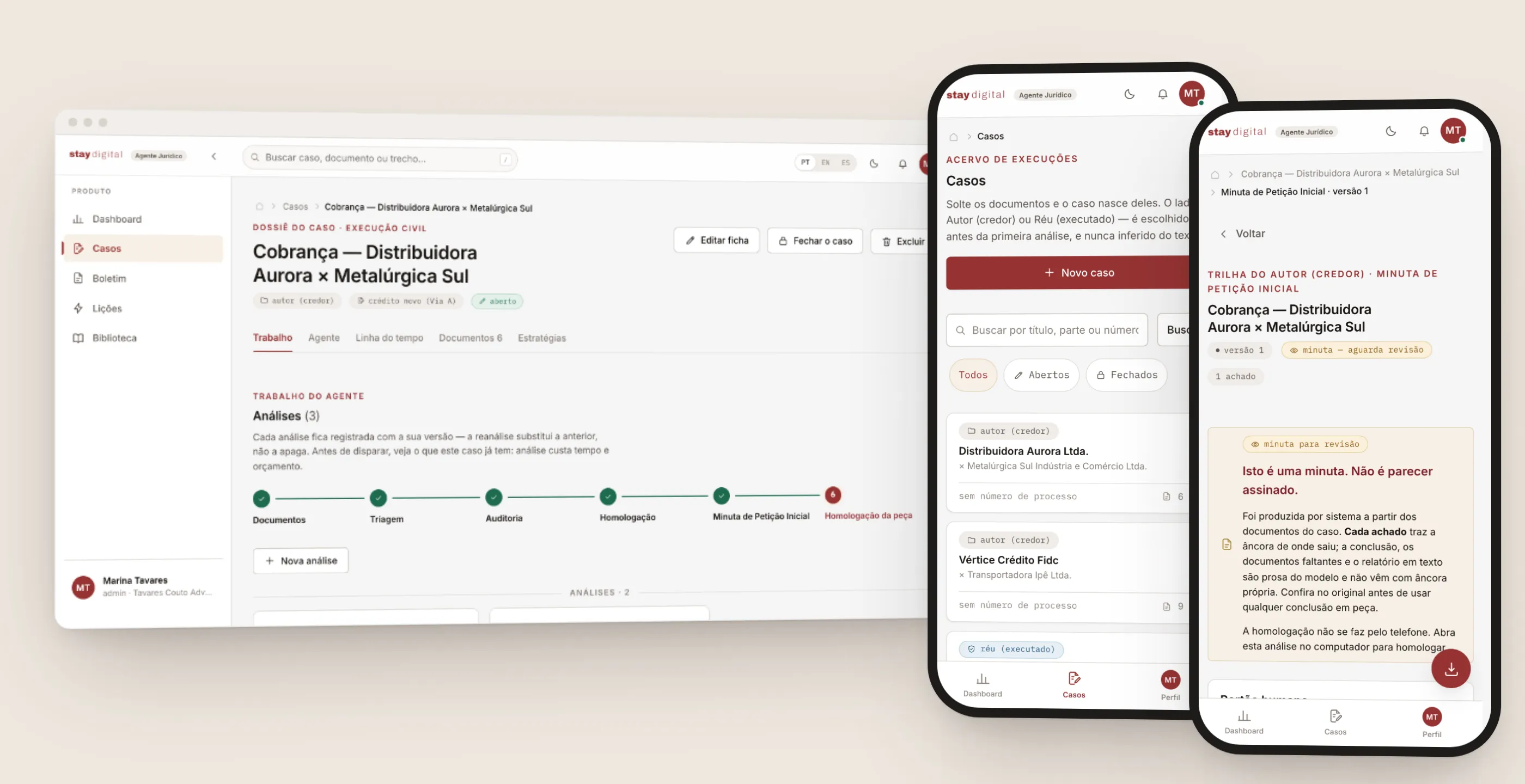
The mobile version was a product decision, not just a layout one. On the phone, the lawyer checks the list, reads the triage, and downloads the document. But the screen itself says that approval doesn’t happen on the phone, and neither does drafting the filing: running it consumes budget, and the draft is meant to be reviewed section by section, on a screen where that fits.
A draft that doesn’t pretend to be finished
The draft petition arrives with a warning you can’t ignore: “This is a draft. It is not a signed opinion.” Below it are the fields still missing before filing, the same ones that show up in red in the Word file, each with the action to take and, where it applies, a plan B (“if it doesn’t come: convert into a summary collection action”). The downloaded file includes a worksheet page that lists these open items and has to be removed before filing.
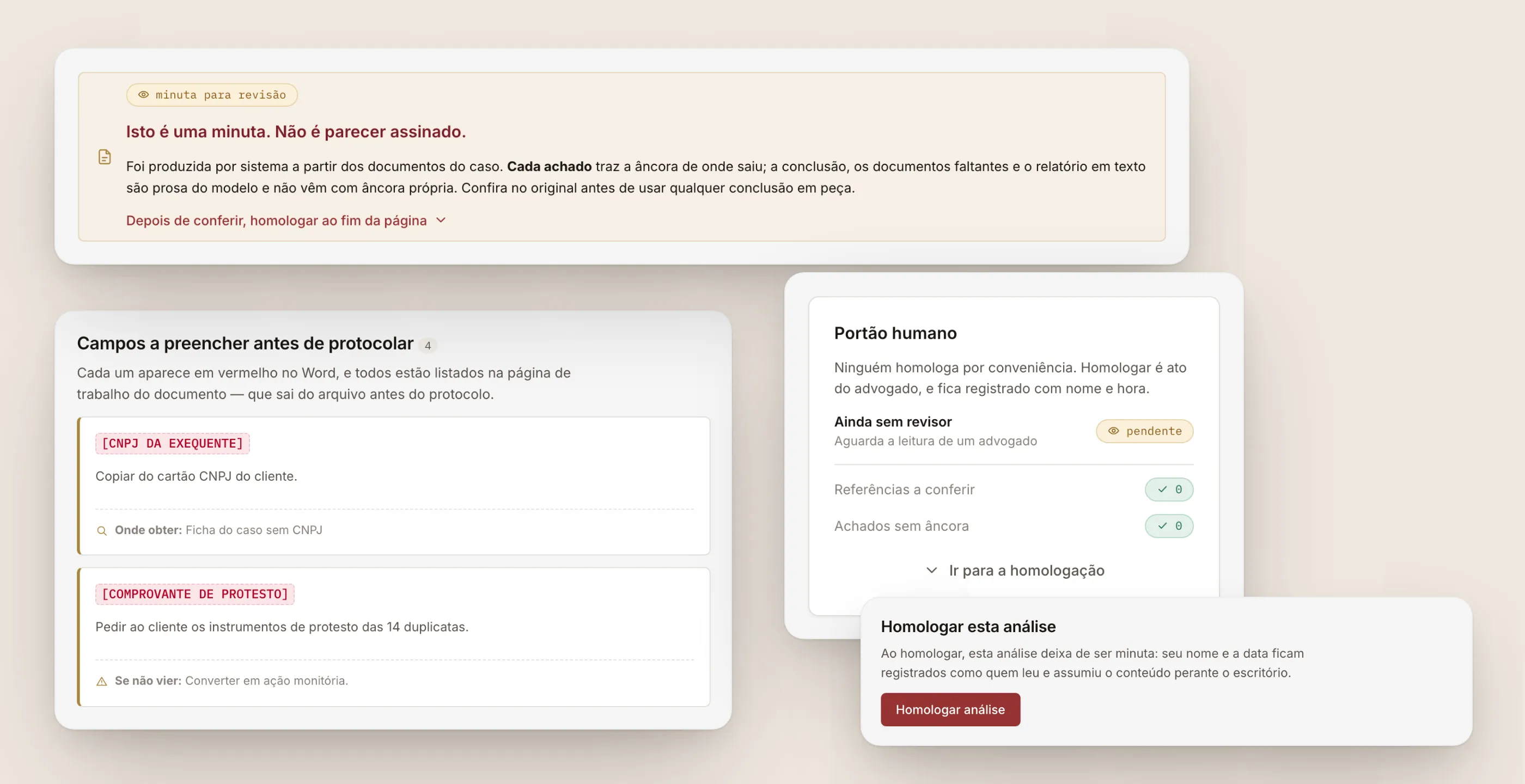
The approve button lives at the end of the page, after all the content, and the text next to it explains what the click means. The full reading view of the filing, in a document typeface, only prints and downloads. It doesn’t approve. The order of the page is the order of responsibility: read, check, own it.
Cost before the click, a source in every sentence
Before any analysis, the run panel shows the path (documents, analysis, draft, review), what the run will read, which document is image-only, and how much it should cost, against how much is still left in the case’s budget. It’s a worst-case estimate, calculated from the largest run the case has had so far, and the screen says so. Only then does the run button appear.
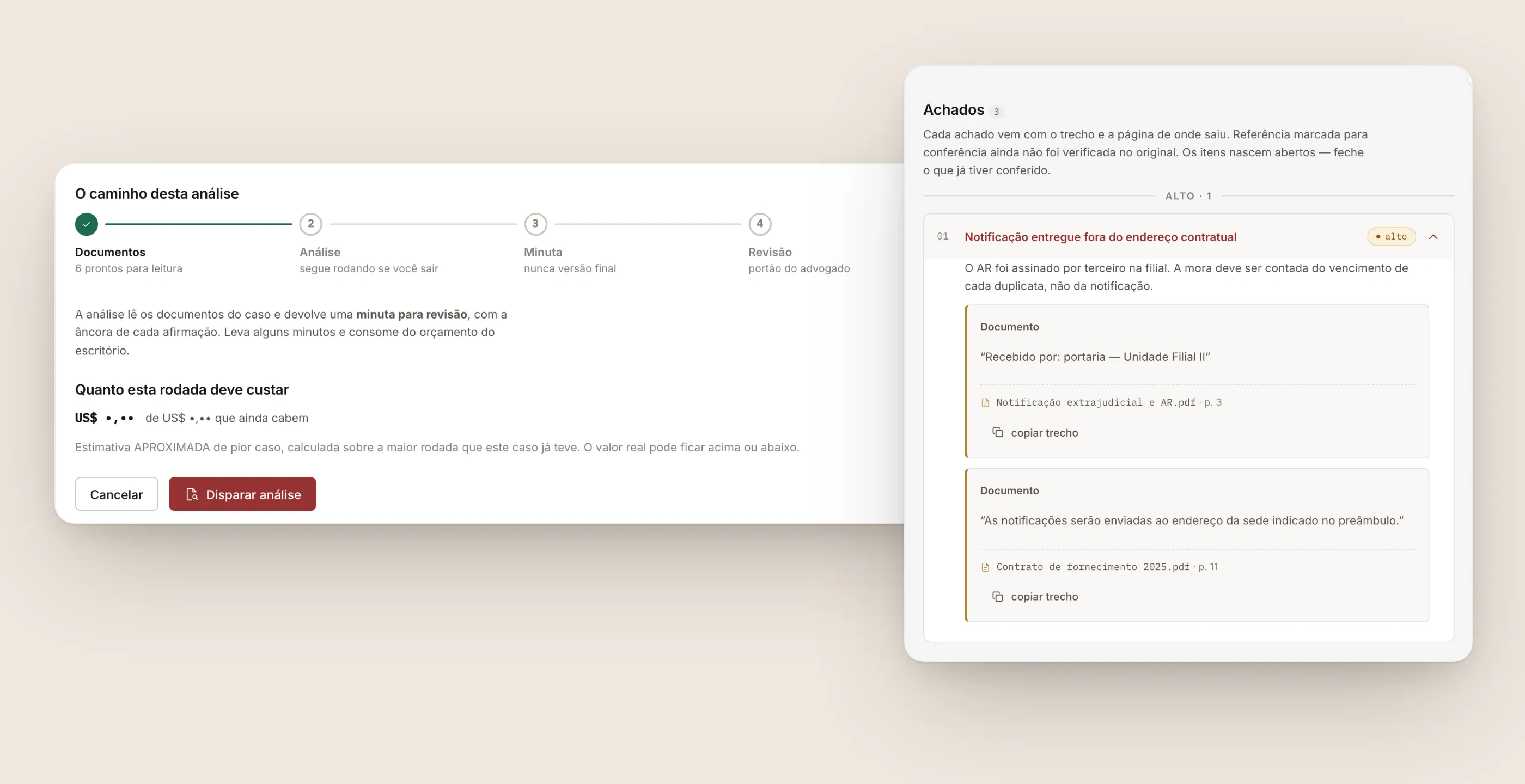
On the other side, each finding in the analysis has a severity, an explanation, and its anchors: the verbatim passage in quotes, the document name, and the page, with a button to copy the passage. The lawyer checks the source instead of rereading the case file.
Learning through context, with a human gate
The Agent tab brings together two things: instructing the next analysis and asking questions about the case. Every answer comes labeled as a draft, with a record of what the agent consulted to produce it.
When the conversation reveals something worth keeping, the agent proposes it: an instruction for this case or a lesson for the whole firm. Nothing is saved on its own. The lawyer accepts with one click.
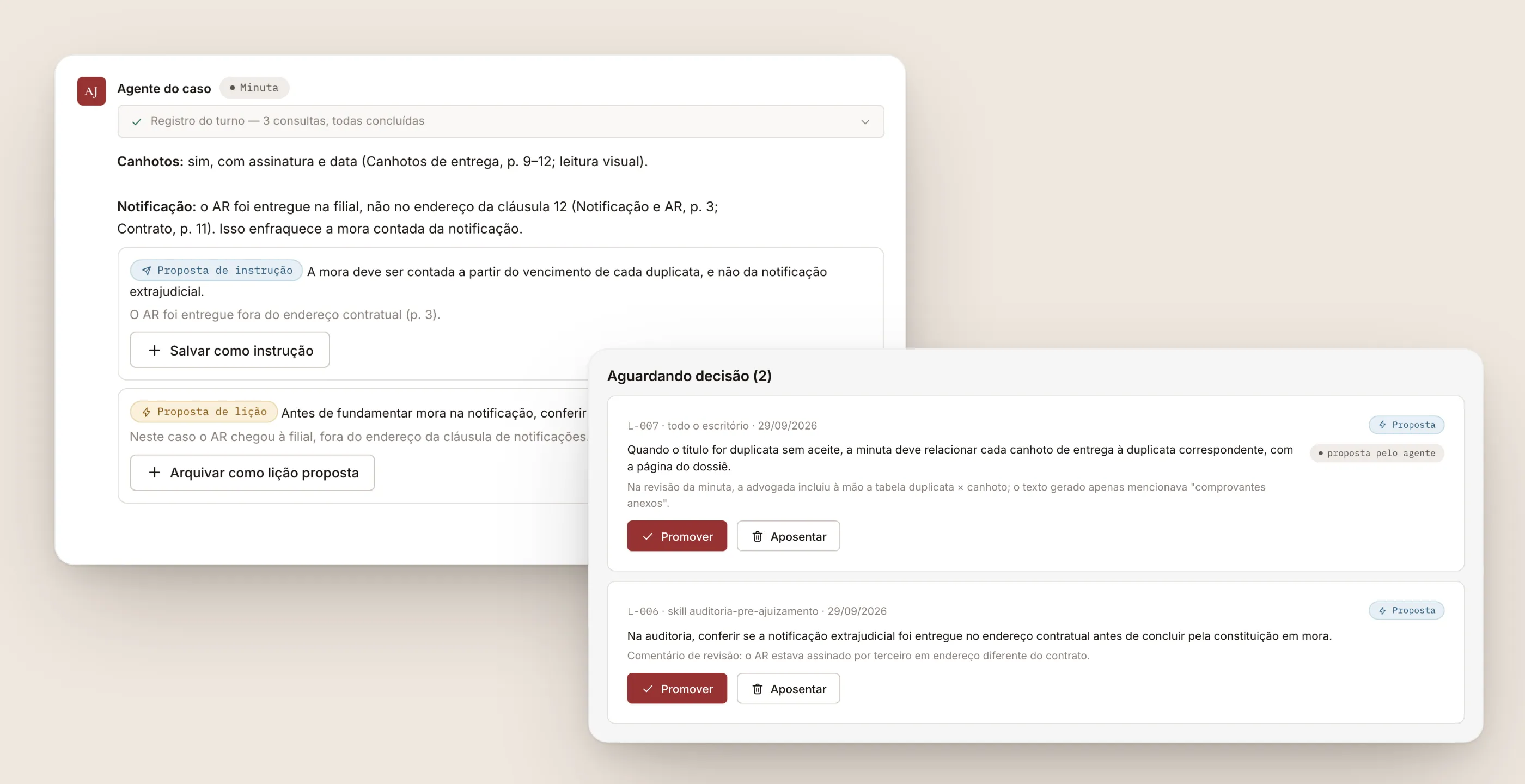
Lessons are the system’s continuous learning. They start as proposals, coming from the conversation or from comparing the generated text with the text the lawyer approved. Only a partner can promote a lesson to active, and only active lessons go into subsequent analyses. Each one tracks how many times it helped and how many times it got in the way, and editing doesn’t overwrite: every rewording becomes a new version.
The product also talks to the AI assistant the lawyer already uses, through MCP. Instead of copy and paste, a connection with scope, expiration, an audit trail, and revocation. And the connections screen says what it doesn’t do: it doesn’t open the case PDFs, doesn’t approve, doesn’t promote lessons.
Under the hood
A React web interface, a Node API, and a Postgres database with per-firm isolation enforced in the database itself, documents encrypted at rest, a queue in the database, and local vector search for the knowledge base. Giant case files are read in chunks, with local OCR on scanned pages.
It took about five weeks, more than 500 commits, and 170 pull requests, built by a team of AI agents with three human gates on every delivery: product, technical plan, and security.
What changed
The creditor’s full workflow was validated end to end on a real case: triage, legal opinion, audit, and an approved draft on the firm’s letterhead. The learning loop closed too: review corrections became proposed lessons, a partner promoted some of them, and the system recorded when they were used in subsequent analyses. In one of the real runs, the filing plan flagged as a critical alert a deadline error that was in the human instructions themselves.
What was done by hand. Pasting the case file into a personal chat, rereading hundreds of pages to trust a sentence, saving the analysis in Word, and repeating a correction a colleague had already made.
What became automatic. Reading the entire file, with OCR on scanned pages, the triage with its binary conclusion, the passage-and-page anchor on every finding, the cost estimate before the click, and the first draft of the filing.
Where a person decides. On the side of the case, which is never inferred from the text. On approval, with name and time, only on the computer. On lessons, which the lawyer accepts and only a partner promotes. On everything the machine writes, which stays a draft until someone signs off on it.
What I took from this project
“Human in control” isn’t a disclaimer in the footer. It’s a design decision that shows up on every screen: the draft label, the gate that counts anchors, the approve button at the end of the page, the proposal waiting for a click, the lesson waiting for a partner, the cost that appears before the button, the phone that lets you read but not sign.
The second lesson was about learning. The question “how do we train the model?” almost always hides another one: “how does the system get better at the way we work?” Answering that with context, rather than with model weights, kept the knowledge visible, auditable, reversible, and in the firm’s hands.
It’s the same rule I use when AI reads an order photographed on WhatsApp: the machine proposes, a person confirms.