Order automationB2B Ordering2026
Orders arrived as photos of paper notes on WhatsApp, and someone retyped everything. In the new system, AI reads the photo and a person only checks it.
- Client
- Lubricant distributor
- Role
- Product builder: discovery, design, and AI-driven development
- Timeline
- 11 days (from first commit to the current version)
- Disciplines
- Product discovery, UX/UI, Applied AI, B2B operations
The context
A lubricant distributor sells to auto repair shops, fleets, gas stations, and industrial companies. The catalog is short and technical: motor oil, hydraulic oil, gear oil, grease. Each product ships in a case, a bucket, or a drum. The customer doesn’t buy a bottle. They buy a load, and they want to know when they can pick it up.
Orders came in through a path any small B2B operation knows well. Someone writes it down on paper, takes a photo, and sends it on WhatsApp. On the other end, a person reads it, retypes it, checks inventory from memory, and replies.
The system I built takes the retyping out of that path. The buyer still photographs the note. AI reads the photo, matches it against the catalog, and proposes the items. A person checks it line by line, and only then does it become an order.
I led the project end to end: the problem, the business rules, the screens, and the build, done with a squad of AI agents working in waves. The first version went live within a few days. After that came near-daily adjustments based on what the client asked for.
The pain
A photo on WhatsApp works until the day someone asks a question about it.
The manual work showed up in four places.
- In the back office, every order is duplicate work. The handwriting is cursive, “balde” (bucket) means 20 liters, “tb” means drum, and the quantity is sometimes a stray number at the end of the line. Whoever retypes it is also interpreting it, and interpreting leads to mistakes.
- In inventory, the balance lives in the head of whoever picks the orders. If the number is wrong, there’s no way to know when it went wrong.
- For the buyer, there’s no history. Repeating last month’s order means digging for the old photo in the chat. Finding out whether it’s been picked means sending a message and waiting.
- For the customer company, the order belongs to whoever sent the message. If the buyer goes on vacation, the history goes with them.
The research
The decision that guided everything else was not asking anyone to change a habit before they got something out of it. The buyer already photographs the note. So the system needed to accept the photo, rather than make people learn a catalog before their first order.
That led to two ways in: build the order from the catalog, or send a photo of the paper. Both end in the same place.
The second decision was about the role of AI. Getting the packaging wrong on a 200-liter drum isn’t a cheap mistake. So the rule is: the AI proposes, a human confirms.
The third was to properly separate the two audiences, the buyer on a phone and the store at the counter, instead of building one screen that tries to serve everyone.
The solution
AI reads the photo and builds the proposal
The buyer photographs the note, just as they already did. The reading runs in the background, matches each line against the catalog, and returns a proposal.
The matching understands the language of the counter. “Balde” is 20 liters, “tb” is a drum, “cx 24” is a case of 24 bottles, and viscosity can be written several different ways. When the first read fails, the system tries again with a larger model before giving up.
A person decides line by line
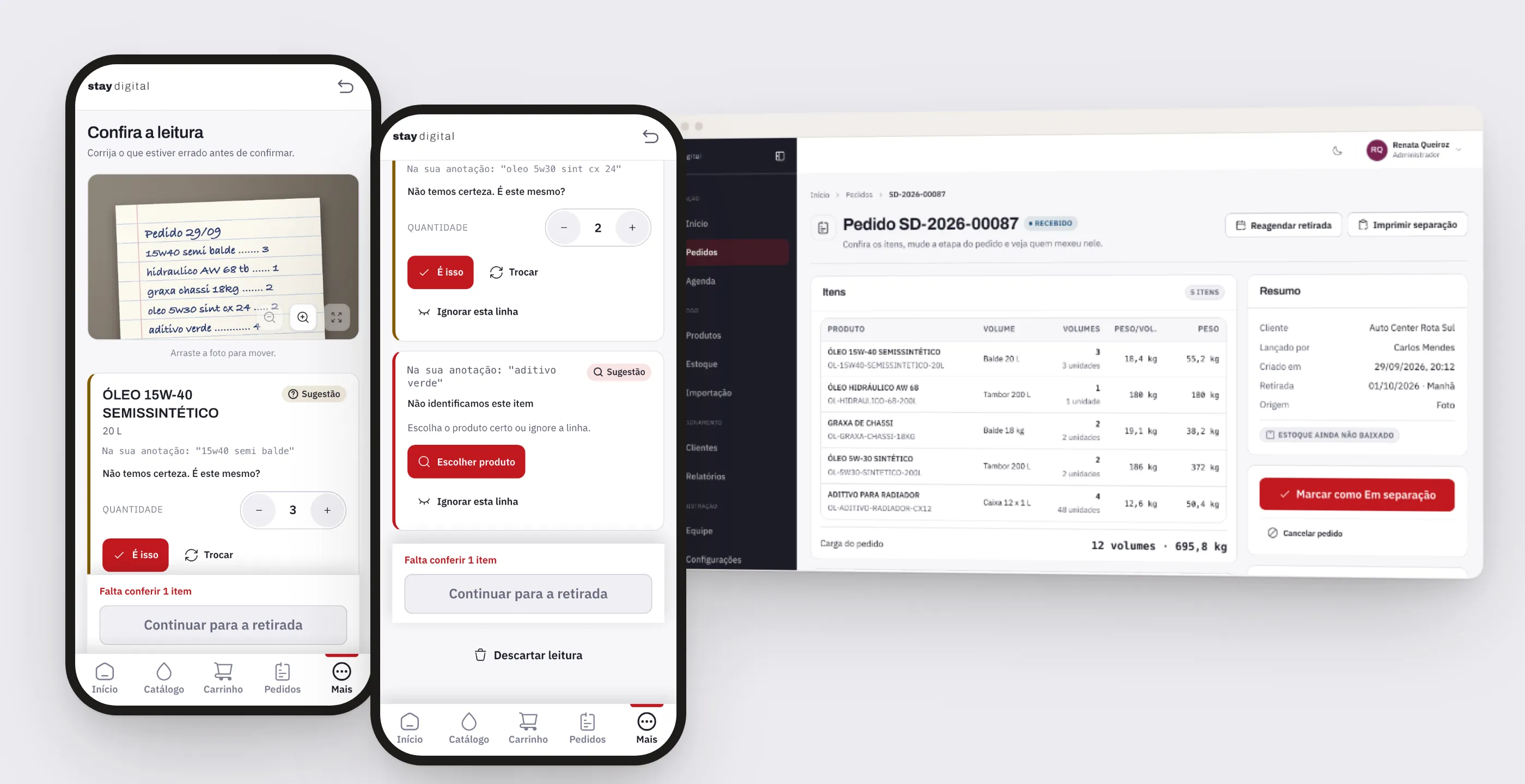
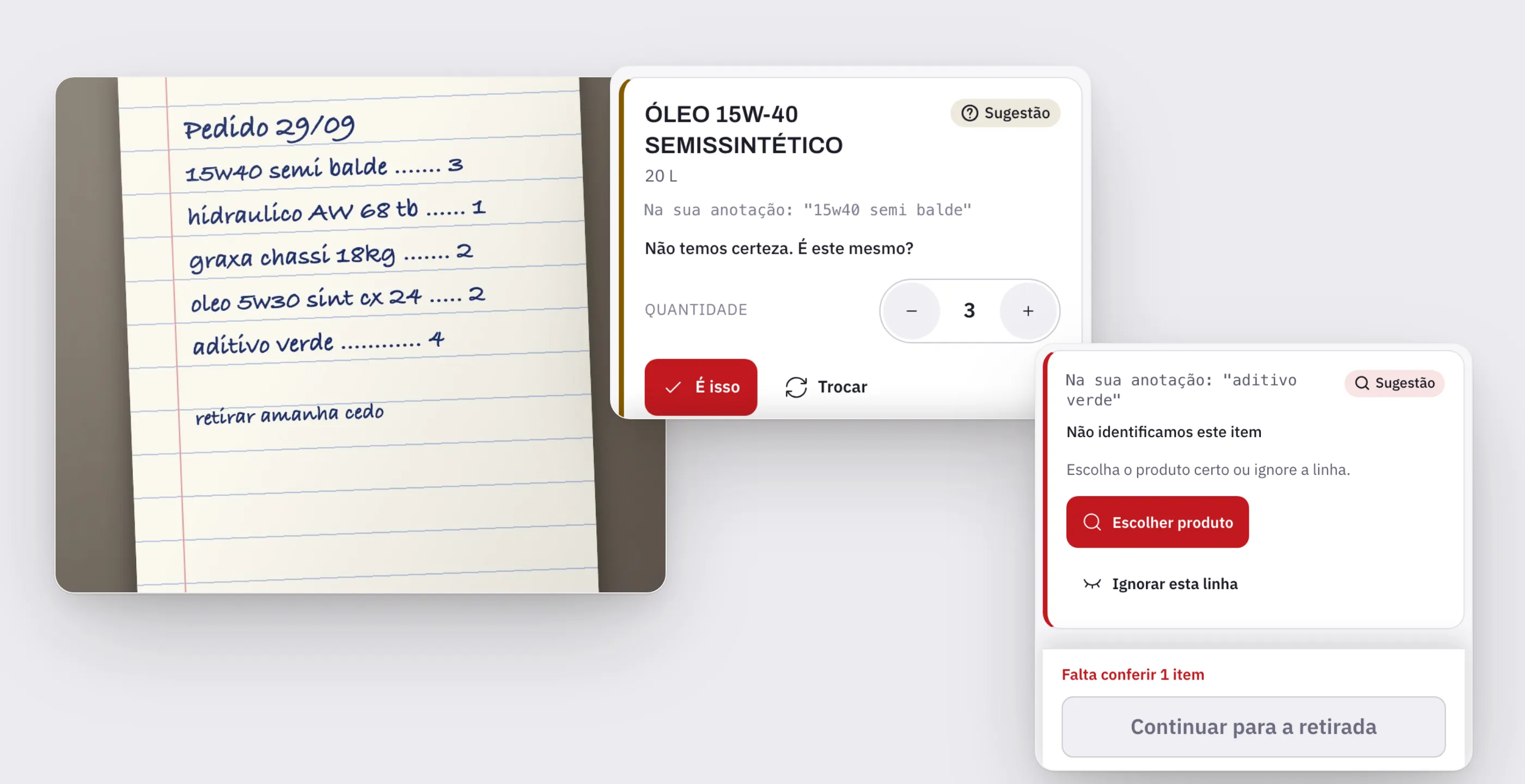
The review screen is where the product decision lives. The photo sits at the top, with zoom, and each line shows what was written on paper next to what the system understood.
A line with doubts shows up as a suggestion: “We’re not sure. Is this the one?”, with an editable quantity and the options to accept, swap, or ignore.
A line the system didn’t recognize isn’t guessed. It’s flagged in red and asks the buyer to choose the product or ignore the line. The continue button only unlocks once no line is left without a decision.
Once confirmed, the order reaches the dashboard like any other, with the same reference number, the same pickup rules, and the same notification. It carries a source tag and the original photo attached, so whoever picks it can double-check.
One decision worth noting: the feature is built and tested, but it was left switched off in production at the client’s request until the real reading is activated. Turning it back on means flipping a switch, without touching the screens.
Two audiences, two screens
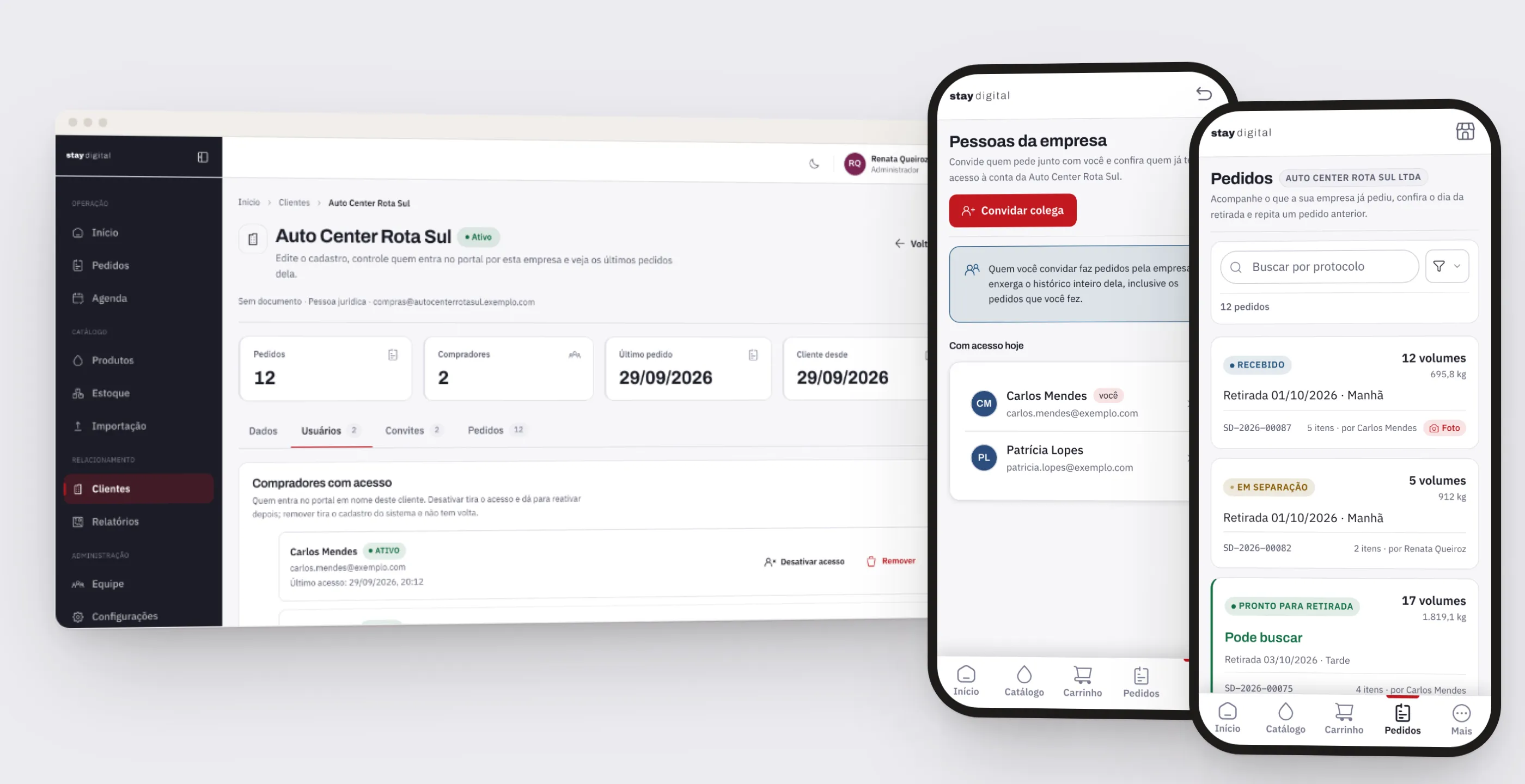
The buyer portal was designed for the phone of someone standing in the repair shop yard: bottom tab navigation, large buttons, no tables. The store dashboard was designed for the computer at the counter: a queue with search, filters by customer, source, and date, counters by status, and the stage advanced right from the row.
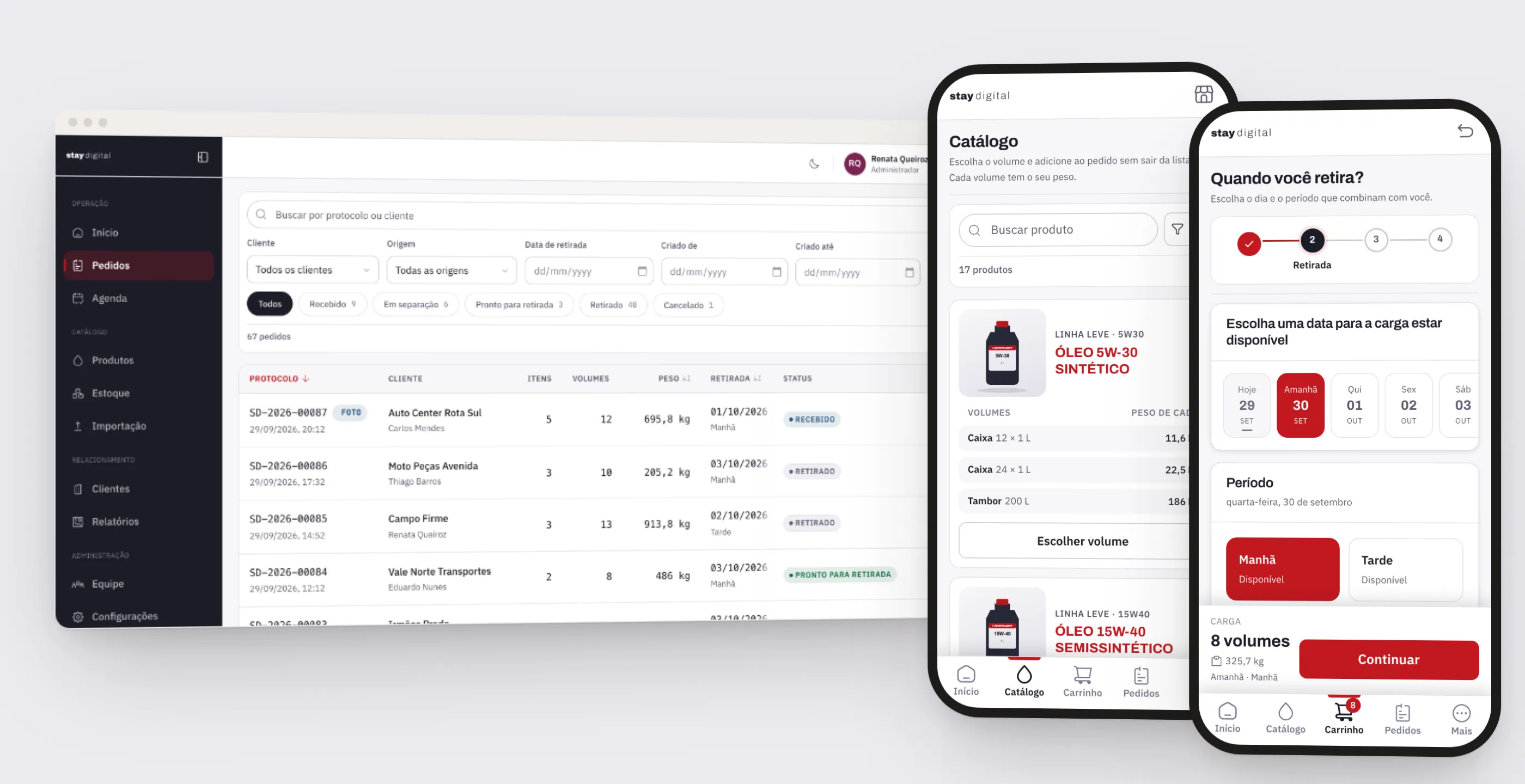
An order goes through five states, always in the same order: received, being picked, ready for pickup, picked up, or canceled. The system doesn’t allow skipping a stage. Going back a stage is reserved for the administrator, and it’s logged with a reason.
Midway through the project, the client changed two rules. They started selling by the case (“12 x 1 L”, “24 x 1 L”) in addition to single units, and asked to remove prices from every screen, because each customer has their own negotiated terms and each state has its own tax. The system still records the price internally, but screens and reports now measure what matters to whoever picks up the goods: units and kilos. That weight is how the buyer knows which vehicle to send.
Pickup is scheduled at checkout, by day and time slot, with the operation’s rules built into the system: closed on Sundays, a cutoff time for same-day pickup, and optional capacity per slot. If two people compete for the last slot, only one gets it. The other is offered alternatives.
An inventory that explains its own number
The store’s home screen sums up the day in numbers that open the queue already filtered: today’s orders, units, and weight, how many are waiting to be picked, how many are ready, and how many photos are waiting for review.
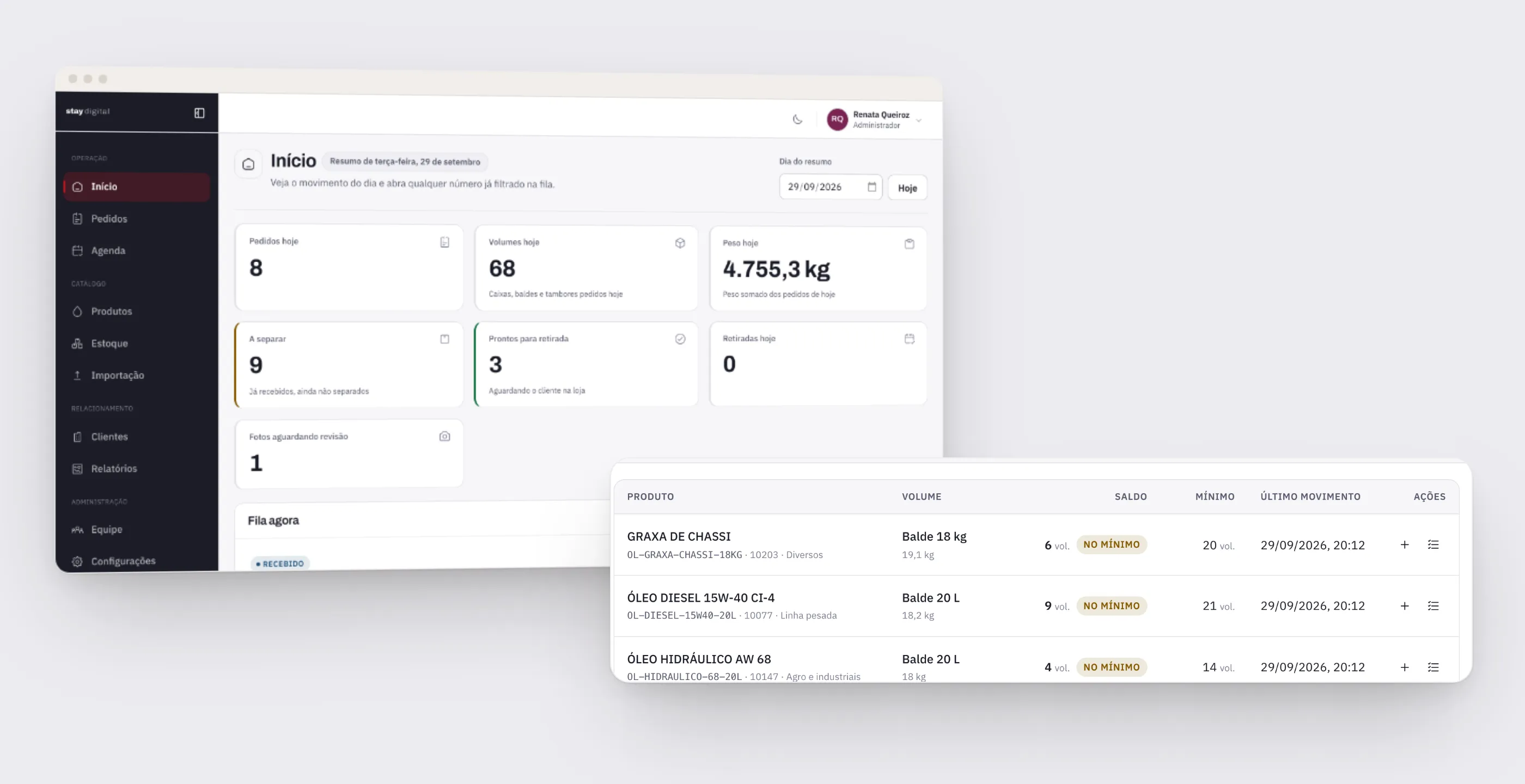
The balance no longer lives in anyone’s head. It isn’t a field someone edits. It’s the result of a ledger: every receipt, order deduction, adjustment, and reversal is recorded with the date, quantity, balance after the movement, and who made it.
Stock is deducted automatically when the order moves to picking, not when it’s received, so goods aren’t tied up by an order that might still be canceled. If an order is canceled after being picked, the reversal is automatic. The “at or below minimum” filter becomes the restocking list.
The order belongs to the company, not to whoever sent it
Access is by invitation only. Each customer company has its buyers, and they all see the same history and the same progress. A buyer can invite a colleague: the invitation carries only the email address, and the company and role are set by the server, never by the screen.
Another company’s orders simply don’t exist for the logged-in user. Isolation has three layers: the API doesn’t accept the company field, a guard rejects the request if it shows up, and the database blocks any buyer without a company.
What runs around it
Rounding out the system are reports in units and kilos by period and by customer, spreadsheet import with a preview before saving, email and WhatsApp notifications with a PDF packing list, and an audit trail of who changed what.
Under the hood it’s TypeScript end to end: a NestJS API on PostgreSQL and two React apps. The queues run on tables in the database itself, with no extra service to maintain on a small server.
What changed
The system is live on the client’s own server, with the buyer portal and the store dashboard at the same address. The real catalog was loaded, the sell-by-the-case and hidden-price rules went into production, and photo ordering is only waiting for the real reading to be activated before it’s turned on.
What was done by hand. Reading the photo on WhatsApp, retyping every line, checking inventory from memory, and replying to the buyer.
What became automatic. Reading the note and matching it against the catalog, deducting and reversing stock, applying the pickup rules, and sending email and WhatsApp notifications with the PDF packing list.
Where a person decides. In the line-by-line review, before the order exists. On the original photo, which stays attached so whoever picks the order can check it. And on any step backward, which only the administrator can do and which is logged with a reason.
What I took from this project
AI was the easiest part to decide on and the part that most needed limits. Reading the photo is the feature that grabs attention, but the value lies in everything around it: showing the original text next to the suggestion, making sure a doubtful line can’t slip through, and having a photo order end exactly where a catalog order ends.
It’s the same rule as in the legal AI agent: the AI proposes, a person confirms.
The other lesson came from the rule changes along the way. Removing prices from every screen looked like a big change. It worked because the decision already lived in a single place, and the screens simply followed it. When a business rule has a single home, changing your mind is cheap.