Proposal automationSales Calculator2026
Salespeople used to leave the meeting owing the customer a spreadsheet calculation. Now they leave with the number, the PDF proposal, and the deck ready, without depending on anyone.
- Client
- Digital education platform
- Role
- Product builder: discovery, design, and AI-driven development
- Timeline
- Feb. to Aug. 2026 (MVP on Lovable + 3 weeks of refactoring and redesign)
- Disciplines
- Product discovery, UX/UI, Internal tools, Document generation
The context
A digital products platform lives on convincing creators (people who sell courses, mentoring, subscriptions) to bring their business over. The creator almost always already sells somewhere else, and they have just one question: how much do I save if I switch?
Answering it took a calculation with many moving parts: the fee on each sale, the per-transaction charge, the monthly fee, the members area per student, video hosting, installment plans. On both sides, for that creator’s revenue and average ticket. And the math was done by hand, during the call, with the customer waiting.
The tool I built does that math on its own while the salesperson fills in the scenario, and turns the result into a proposal, a technical report, and a deck. What stays with the salesperson is what only they know: what the creator pays today and what they’re willing to concede.
The pain
With each salesperson putting the numbers together their own way, three problems showed up.
- Calculation errors in public. One wrong number in front of the customer undermines the credibility of the whole proposal.
- Proposals with no standard. Every salesperson sent different material, with the terms written their own way.
- Dependency. Negotiated fee, cashback target, exclusivity clause: the salesperson had to check with someone before closing.
The tool needed to do the math and hand control of the conversation back to the salesperson.
The research
The first step was to separate what changes from customer to customer from what’s a rule.
Rules are each platform’s cost table: items, categories, and how each one is charged. That can’t live in the code or in the salesperson’s head. It needs to be in a registry the admin updates when a competitor changes its pricing.
The scenario is what the salesperson asks the creator: revenue, average ticket, active students, sales model (recurring, launch, evergreen).
The negotiation is what the salesperson concedes: the agreed fee, custom fees, target-based cashback, contract terms.
With that separated, the calculation engine became predictable. Each cost item has a charge type (percentage, per transaction, monthly, per student, or one-time, spread over 12 months) and can apply only to certain sales models. Transactions are derived from revenue ÷ ticket, with no estimating by the salesperson.
The other premise: the person using it is on a call, under pressure, and can’t lose the thread of the conversation. That guided almost every interface choice.
The solution
The math runs with every field
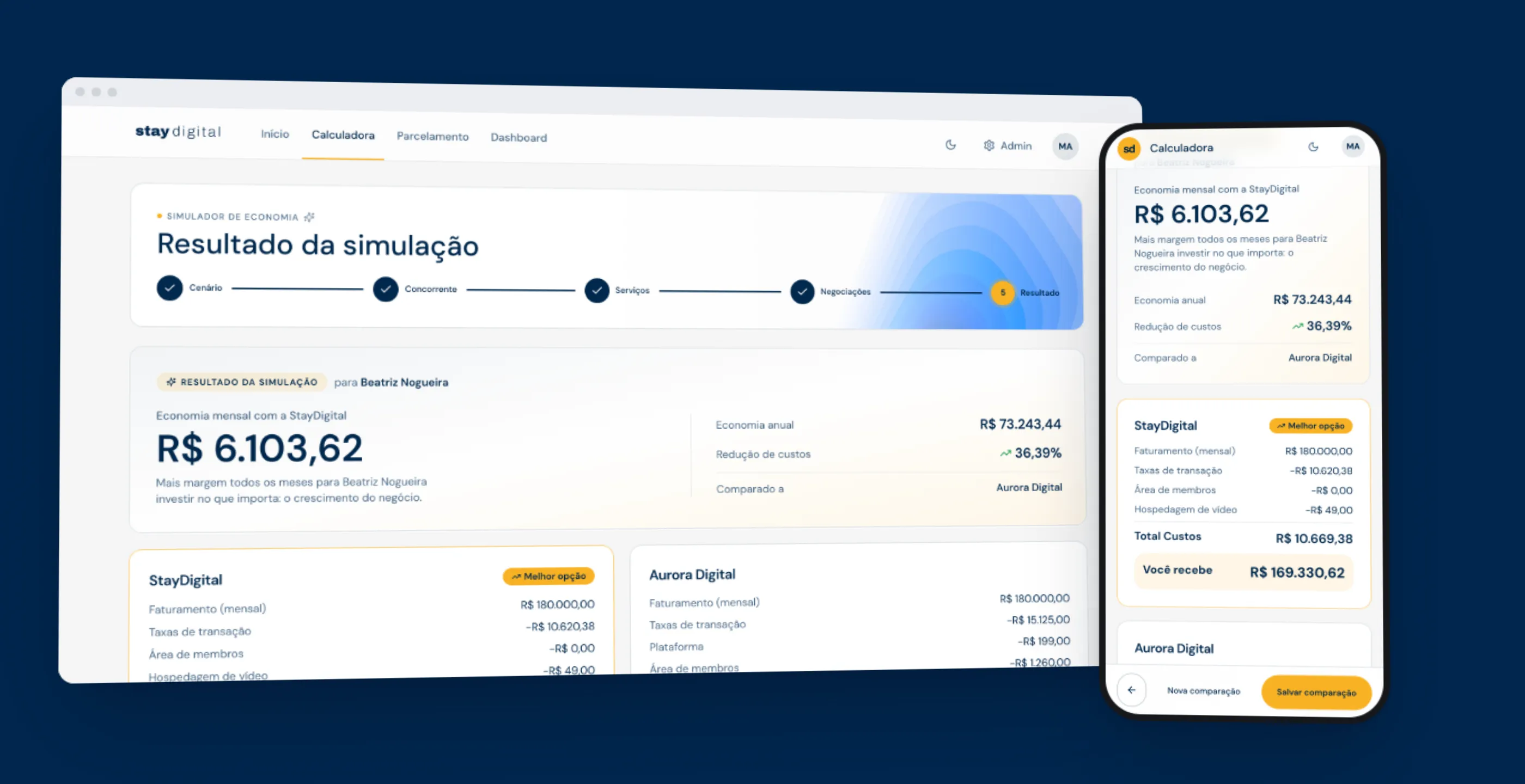
The simulation is a five-step wizard: scenario, competitor, services, negotiations, and result. From the second step on, a side panel shows the monthly savings and the annual projection, and the number changes with every field filled in. The salesperson doesn’t need to finish the form to have something to say.
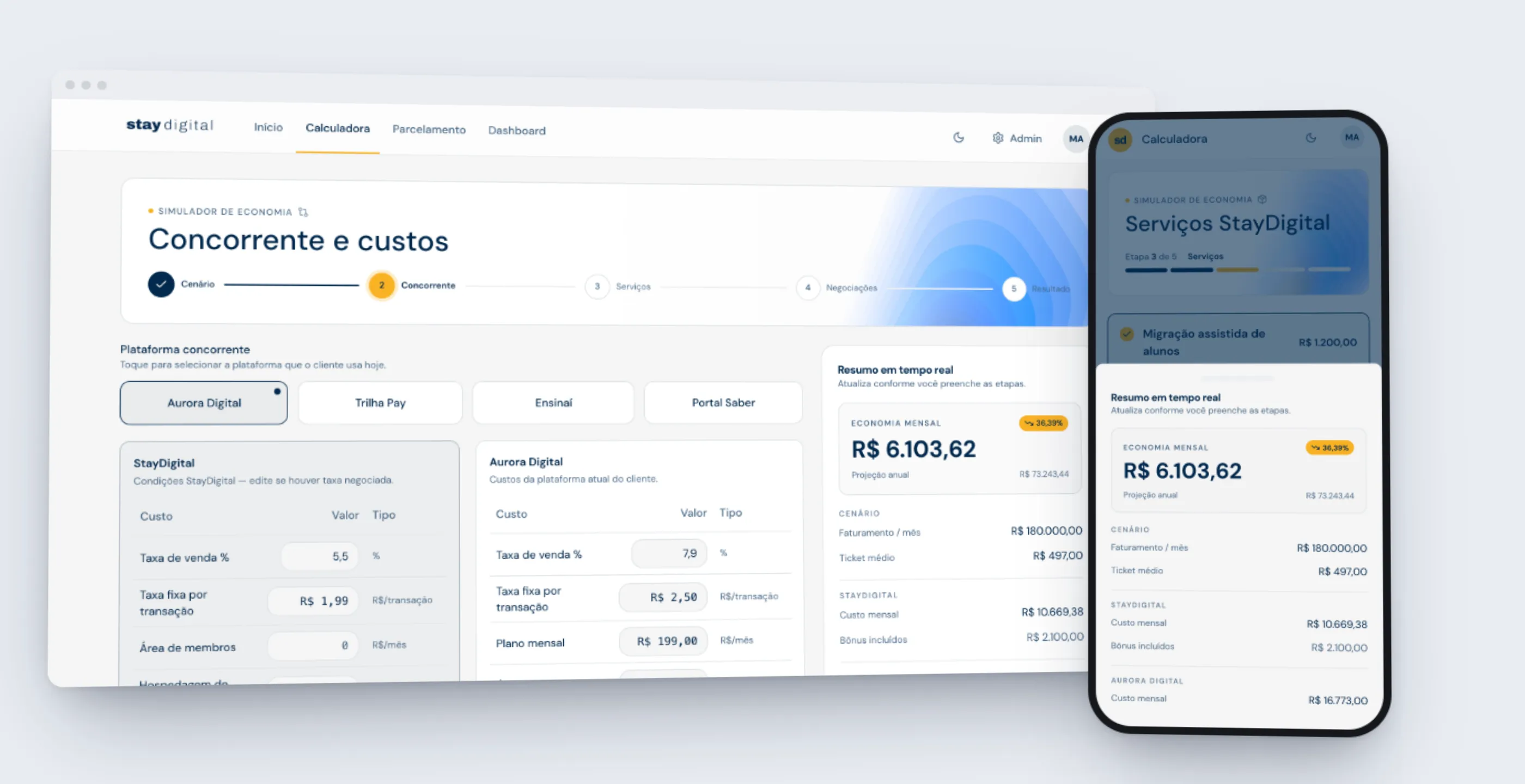
The competitor’s costs come prefilled from the registry, but every one of them is editable. If the creator says “I pay less than that here,” the salesperson adjusts it on the spot or adds a cost that wasn’t on the list. There’s also a “no competitor” mode, for people who don’t sell anywhere yet.
Negotiation on rails, the salesperson’s call
The negotiations step turns what used to be a loose conversation into structured fields. The agreed fee carries over from the previous step. Custom fees come from a searchable catalog maintained by the admin.
Revenue-target cashback, the exclusivity clause, and the high-ticket product note are toggles. On, they go into the proposal with the standard wording. Off, the section shows up as “no agreement.” What to concede is the salesperson’s choice. The wording of the clause is not.
From the math to the material, without leaving the screen
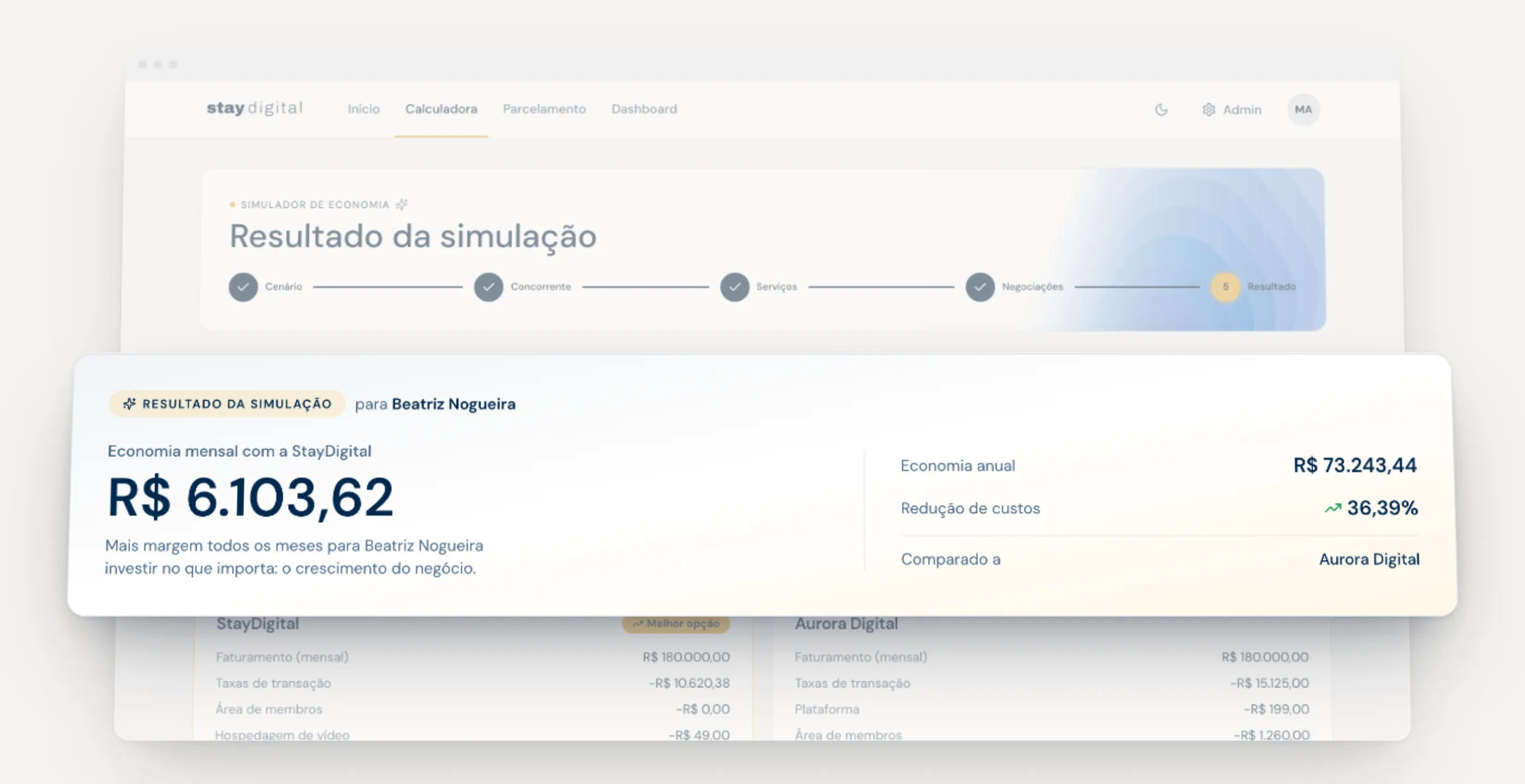
On the result screen, the savings appear in large type, with the percentage reduction and the name of the competitor being compared. Right below are the outputs: presentation mode, send to CRM, technical report, and two proposal variants, one for whoever manages the account and another for whoever closes the deal.
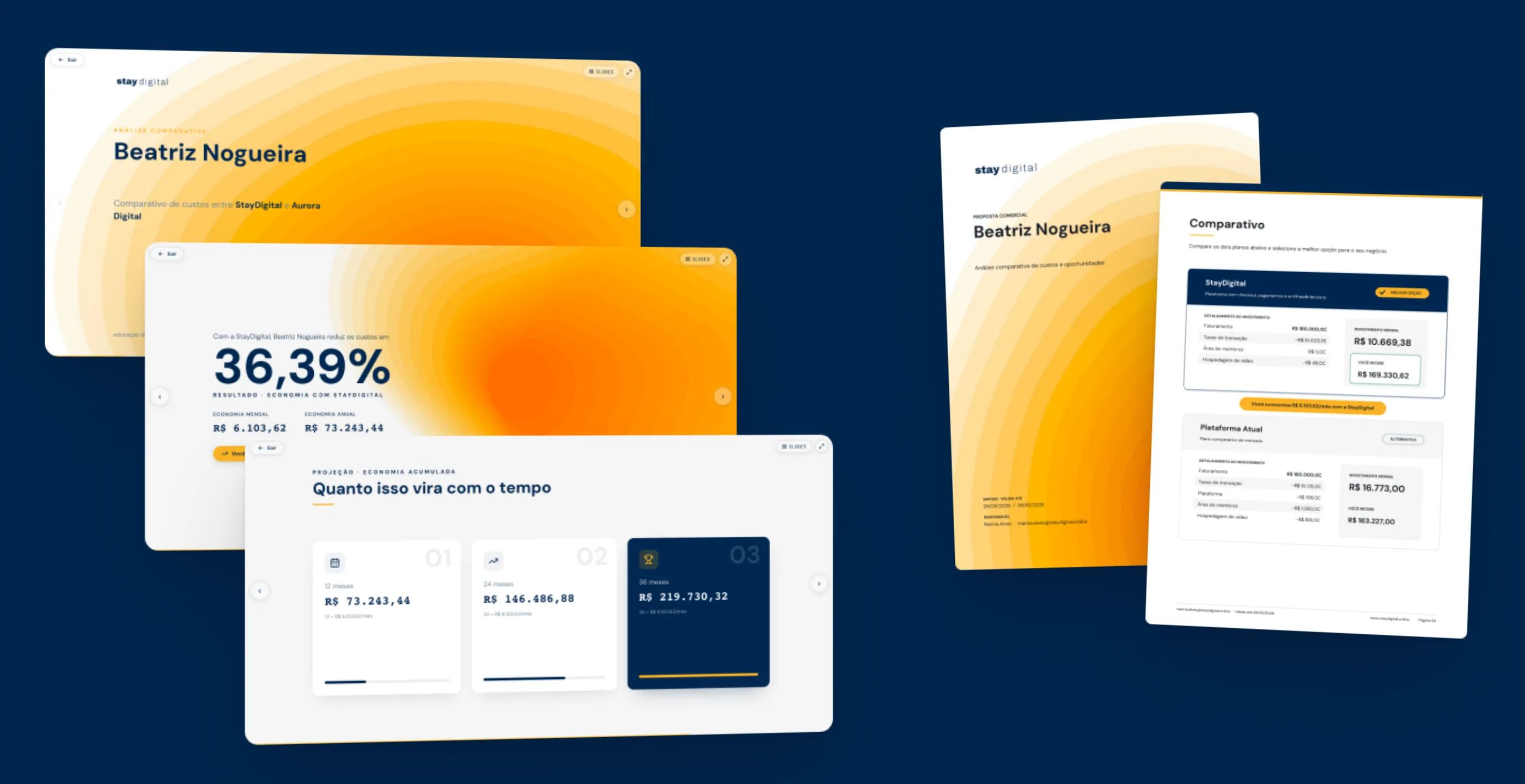
Presentation mode generates a deck from the simulation: a cover with the customer’s name, the scenario, costs side by side, the percentage reduction, projections at 12, 24, and 36 months, included bonuses, and a closing slide. You can go back to the wizard without losing what was filled in, a back-and-forth that once wiped data and was fixed.
The PDFs are generated in the browser itself, with a component engine shared by the proposal, the technical report, and the installment table. That’s why the visual identity is the same across all of them. Rendering the actual PDF, rather than just testing the logic, surfaced an old bug: the last column of the table spilled a few millimeters past the margin. Nobody had noticed before.
Installments as a sales argument
A second simulator answers another common question: what happens when the buyer pays in installments? There are three tabs: with interest (the customer pays), interest-free (the creator absorbs it), and cashback on the interest. Cashback started as its own tab, was merged into the with-interest tab, and went back to being its own tab after the client saw both versions live.
Details matter for someone typing in a hurry. The amount fields behaved like a card terminal: typing into a filled field appended digits to the old value. Now the field clears on focus and restores the value if nothing is typed. And the draft is saved in the browser: if the tab closes mid-call, the salesperson picks up where they left off.
On mobile, too
On mobile, the summary becomes a sticky bar above the buttons that opens as a panel. The screen structure is the same at both sizes. Before, switching between the desktop and mobile versions reloaded the page and wiped the form being edited.
History and business rules in one place
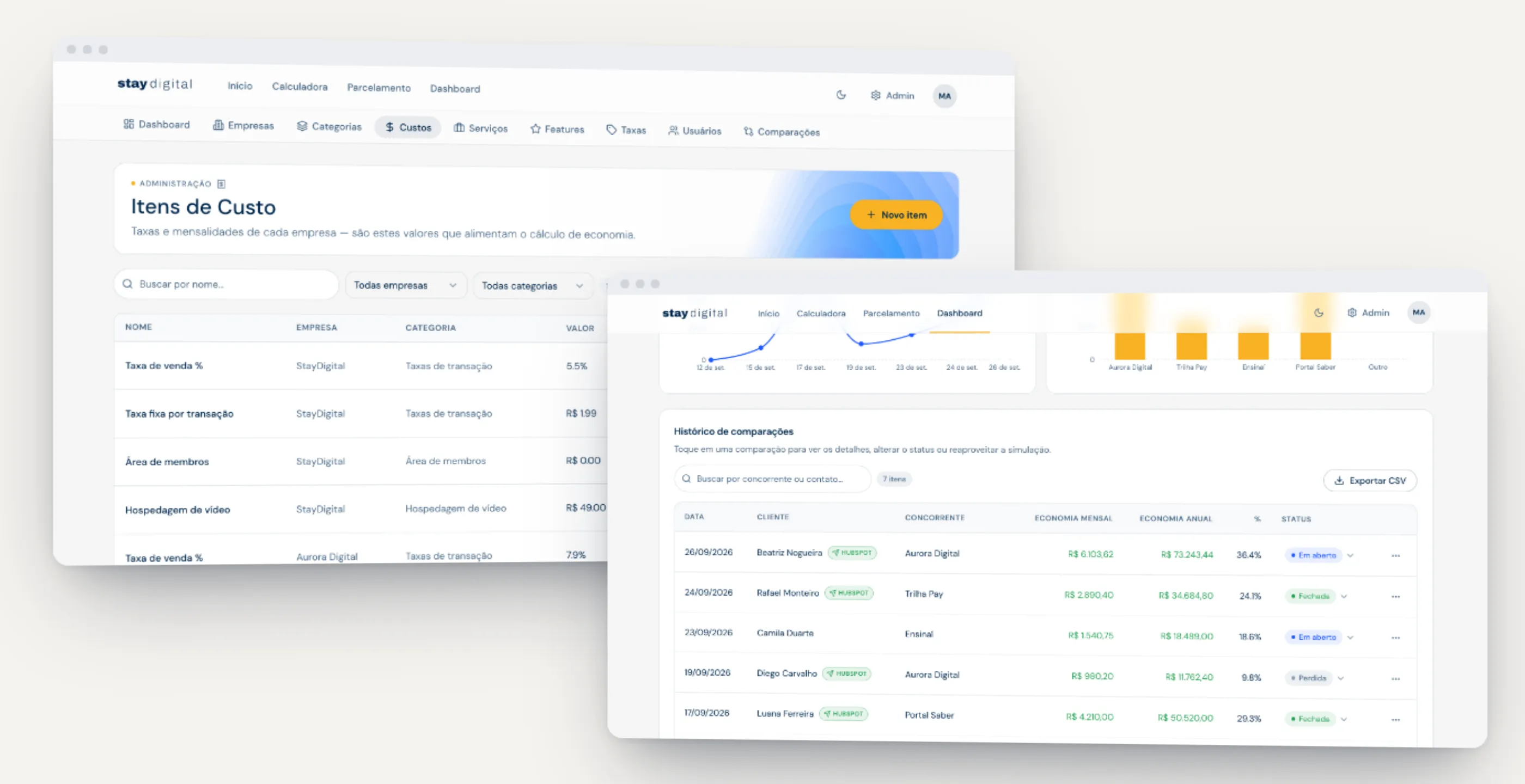
Every saved simulation goes into a history with a status (open, won, lost), an indicator of whether it was sent to the CRM, and CSV export. The admin maintains the registries that feed the calculation: competitors, categories, cost items, services offered as bonuses, and the fee catalog.
From MVP to product
The first version was born on Lovable, with the database, login, and files on Supabase. It served to validate the idea. To become a working tool, it needed control: predictable deploys, access rules on the server rather than in the browser, and data in the client’s custody.
That’s why the migration was a product decision, not just a technical one. An in-house API (Node and Express) and containerized PostgreSQL came in, and the front end lost direct access to the database. Login became a six-digit code sent by email, allowed only for corporate domains. Sending to the CRM got a simulation mode and a log of every attempt. And promoting someone to administrator was deliberately kept out of the dashboard.
What changed
The migration off Lovable happened without data loss: users, registries, and history came over with their identifiers preserved, and the old passwords kept working. A battery of tests (API, unit, end-to-end on desktop and mobile, infrastructure) found three real bugs and closed the second round with every case passing. One of them: the database returned decimals as text, and the calculator displayed “NaN.”
What was done by hand. The savings calculation, put together by each salesperson their own way during the call, and the proposal written afterward, with the terms worded by them.
What became automatic. The math with every field filled in, the transactions derived from revenue ÷ ticket, the deck, the PDF proposal, the technical report, the installment table, and the send to the CRM.
Where a person decides. The salesperson edits any competitor cost, chooses what to concede in the negotiation, and decides when to send. The admin maintains the registry that feeds the math. Promoting someone to administrator stays out of the dashboard.
What I took from this project
Internal tools tend to be treated as second-class products. But the people using this one are in a conversation that’s worth money, and every second of hesitation in front of the customer has a cost.
The central decision was to take the rules out of people’s heads and put them into a registry. Everything else followed from that: live numbers, negotiation on rails, ready-made material.
And the process lesson: validate on the final artifact. The PDF margin bug and the form that vanished when the phone was rotated only showed up when someone opened the file and actually used the screen.